Tell A Friend
The "Tell a Friend" module is a feature that allows visitors of your site to fill out a form and invite friends via email to check out the website, attend an event, or anything else you would like them to be able to tell their friends about.
To add the Tell a Friend feature to your page, go to the Add Items menu and click Tell a Friend. This will open the edit options in a new window.
In addition to sending a message to the friend, the Tell a Friend feature also allows you to store the friends contact information in a database that you have access to, so that you can later reference or contact those people. The contact information will be stored in the group that you specify in the Group Name field (1). This is the same database of contacts used for Signup Forms. For more information, see Contact Management.
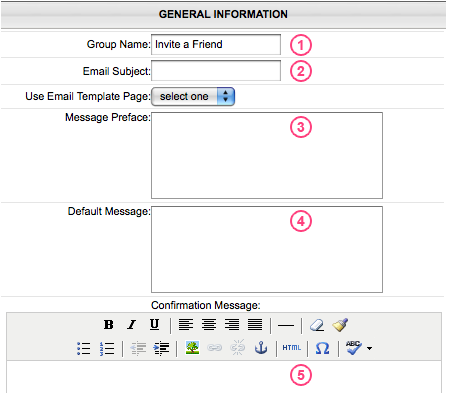
Email Subject (2) will be the subject of the email that is sent to the friend. The Email Message Preface (3) is a message that you (the administrator) want placed at the beginning of every email. This cannot be changed by the person filling out the form. If you do not want to use this feature, simply leave it blank. The Default Email Message (4) is a suggested message that will already be placed for the person filling out the form to send to their friend, but they will have the ability to delete or modify that message and enter their own. Lastly, the Confirmation Message (5) is an auto-reply from you that is sent to the person sending the invite, usually thanking them for inviting their friend.
subpages
- Advanced Security
- Anchors
- Blogging
- Calendar
- Contact Management
- Domain Transfers
- E-commerce
- Email Marketing
- Embedding Videos
- Event Box
- Flash Event Box
- Flash Photo Gallery
- File Box
- Forms
- Go Live
- Image Manager
- Image Verification
- Multimedia Box
- Page Layout/Properties
- Pages
- Podcasting
- SEO Basics
- Sorting Content
- Social Media
- Sub Page Box
- Troubleshooting
- Website statistics
- WYSIWYG FAQs
- Video Standards
- Walkthrough